


Todoist: To Do List & Calendar
4.616.58K Reviews
App Specs
- Version
- Varies with Device
- Updated On
- License
- Free
- Downloads
- 10,000,000+
- Developer
- Todoist Inc.
- Categories
- Productivity
- Platform
- Android, iOS
Screenshots

 Analysis by AppCompare
I notice Todoist most when a small detail needs to survive a busy day: a call to make after work, a shopping item I might forget, or a task someone else is waiting on. It is a productivity app from Doist Inc., and its appeal is less about turning every hour into a system than about giving loose ends a place to land. I find it most useful when I can capture a thought quickly and return to it later, rather than trusting my memory or scattering reminders across chats and notes.
When a task depends on a connection
Because tasks can be shared and connected with other tools, the experience is not entirely self-contained. A change that needs to reach a teammate, or an idea sent from another service, depends on communication between apps and the network. I treat the task list as a useful home for plans, but I avoid assuming that a newly entered change has already reached everyone else until the app has had a chance to sync. That small habit matters most for shared work, where an outdated view can cause confusion.
For personal planning, a brief delay is usually less serious: I can write down an errand and deal with it when I next check my list. Team tasks are different. If ownership or timing has changed, I would make sure the people involved know before relying on the update. This is a sensible distinction for any connected task manager, and it keeps Todoist from being mistaken for an instant messaging tool.
Quick capture on a phone, careful planning later
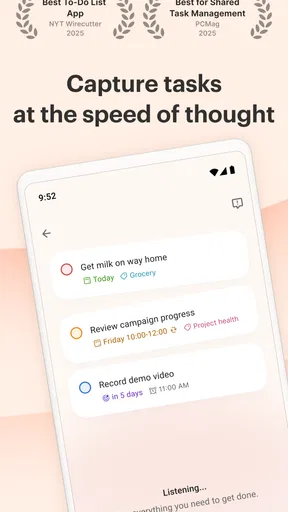
The phone format suits the moments when I am away from a desk: adding a reminder between appointments, noting an item while walking through a shop, or recording an idea before it slips away. Voice capture can help when typing is awkward, though I still like to glance over what was captured and make sure the task says what I mean. A short, specific task is easier to act on than a vague note that I have to decode later.
My preferred rhythm is to capture quickly on mobile and organize when I have a quieter moment. I might put “ask Sam about the venue” into the right project first, then add a useful date or priority when I can think clearly. That separation keeps a fleeting thought from becoming a mini administrative chore. It also helps answer a common practical question: do I have to build a perfect system before using the app? I do not think so. Start with a few meaningful projects, then add structure only when a real need appears.
The First Impression
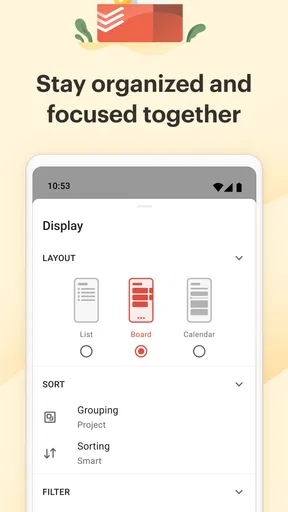
When you first open Todoist: To Do List & Calendar, the clean interface is like a breath of fresh air. It's intuitive, sleek, and doesn’t overwhelm you with options, which is exactly what you need when you’re trying to get organized. The app’s design focuses on simplicity and functionality, making it easy to jump right into creating your task list.
Task Management Made Easy
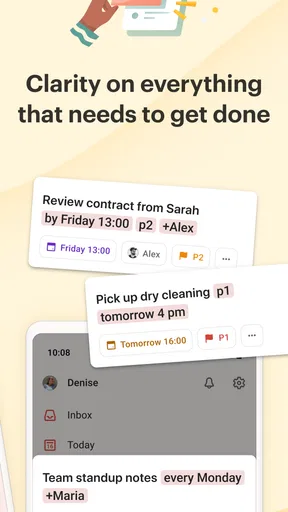
Adding tasks is as simple as jotting them down on paper. Just click the “Add Task” button, type your task, and you’re good to go. You can even set priorities, assign due dates, and add labels to keep everything neatly organized. It’s like having a personal assistant in your pocket.
Worth Reading Before You Choose

EA SPORTS FC Mobile 26 Is a Bigger Football Game, but It Takes Time

Flipboard Shows What News Apps Must Do Beyond the Feed

Switching to Android Auto Means Rethinking Your Driving Routine

Google Calendar Makes a Crowded Week Easier to Manage

Ludo King Makes the Most of the Minutes Between Plans

Baby Panda World Brings Quick Play to Modern Phones, but Its Game Library Feels Busy
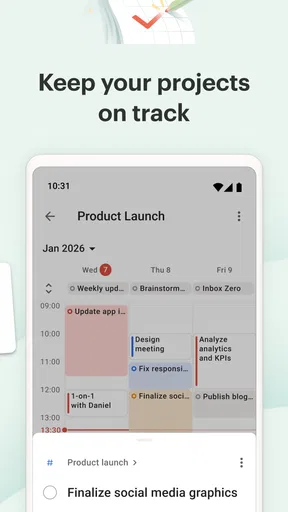
The beauty of Todoist is in its versatility. Whether you’re planning a grocery list or managing a team project, it’s got you covered. You can create different projects for various aspects of your life, like work, personal, or even a dream vacation. And if you’re like me, the satisfaction of checking off completed tasks is pure bliss.
Integration and Productivity Boosters
Todoist isn’t just a standalone app; it plays well with others. You can integrate it with your email, calendar, and even voice assistants. Imagine telling your device to remind you of a meeting, and boom, it’s in your Todoist schedule. Productivity at its finest!
And let’s not forget the Karma system. Yes, Todoist rewards you with Karma points for completing tasks and maintaining streaks. It’s a fun way to stay motivated and track your productivity progress. Plus, who doesn’t love a little pat on the back for a job well done?
Collaboration and Sharing
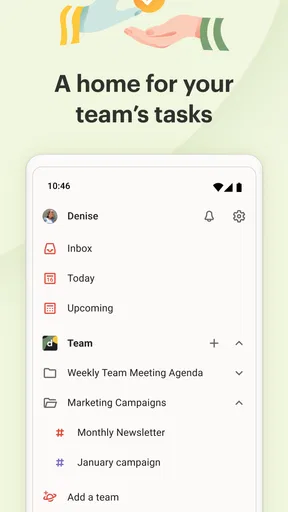
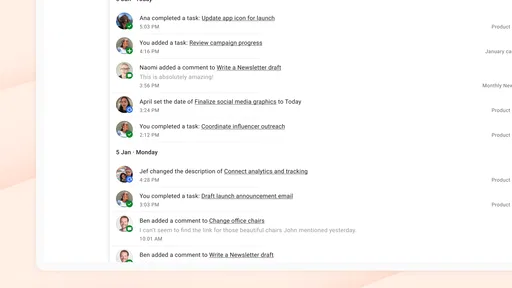
If you’re working on a group project or planning an event with friends, Todoist’s collaboration feature is a lifesaver. You can share projects, assign tasks to others, and monitor progress in real-time. It’s like having a digital workspace where everyone is on the same page.
The app also offers comments and attachments, so you can keep all the necessary details and files right where you need them. No more digging through emails or messages to find what you’re looking for.
A Few Personal Touches
Customization is key, and Todoist lets you personalize your experience with themes and filters. Whether you prefer a dark theme for late-night planning or want to filter tasks by priority, it’s all at your fingertips. The app adapts to your style, making task management a personal affair.
Choosing the right amount of structure
A useful way to keep a task list from becoming cluttered is to separate projects by context rather than creating a new one for every individual job. For example, I would keep household errands together and reserve a work project for things that genuinely need a work context. Labels can then distinguish a quick call from something that needs focused time. The trade-off is that too many labels and filters create another system to maintain; if I spend more time sorting tasks than doing them, I scale back.
Todoist also works best when a task describes an action, not just a topic. “Prepare the presentation” gives me a next step; “presentation” is more likely to sit there untouched. For a larger piece of work, I would break the outcome into smaller tasks only when the sequence is useful. This makes priorities and due dates more meaningful, and it prevents the list from turning into a collection of broad intentions.
A realistic day with shared and personal tasks
Imagine I am heading to work, remembering that I need groceries, and coordinating a weekend plan with friends. I can capture the shopping item as a personal task, place a work follow-up in its project, and share the event-related jobs with the people involved. Later, I can check what is due and decide what realistically fits into the day. The value is not that the app makes those commitments disappear; it is that each one has a clear place and, where appropriate, an owner.
For a group, I would use shared tasks for concrete responsibilities such as booking a room or bringing supplies, rather than copying every conversation into the project. Comments and attachments can keep relevant context close to a task, but they do not replace a conversation when people need to discuss a decision. That boundary helps collaboration stay useful instead of turning the project into another noisy inbox.
What to expect from plans and pricing
The app is free to start, with in-app purchases ranging from under a dollar to just under sixty dollars per item. I would begin with the free experience and see whether the basic task flow fits my routine before paying for anything. The deciding question is practical: am I regularly running into a limit that affects how I work, or am I simply tempted to add more features before I have built a habit? I would not upgrade just to make a simple grocery list feel more official.
Todoist has been available since November 2012, and it is rated for Everyone. It has an average rating of 4.6 from around 296,000 ratings, with more than 10 million installs. Those figures suggest a widely used option, but I would still judge it by whether its way of organizing tasks feels natural to me. Popularity cannot compensate for a workflow that I find fiddly.
Where it fits among other task tools
Compared with a basic notes app, Todoist gives tasks more structure through due dates, priorities, projects, and shared work. Notes are often better when I am collecting loose information without knowing whether it needs action. A calendar, meanwhile, is stronger for seeing appointments against time; I would keep fixed meetings there and use Todoist for the actions around them, such as preparing, following up, or remembering what to bring. The two views solve related but different problems.
For someone who wants a lightweight checklist and nothing more, a built-in reminders app may feel faster and require less organizing. For a team that needs detailed project planning, dependencies, or a specialized work-management setup, a dedicated project tool may be a better fit. Todoist occupies a useful middle ground: more deliberate than a plain list, but still approachable for personal tasks and modest collaboration.
When something goes wrong, keep the workflow simple
If an update matters to another person, I would check that it is visible before assuming the handoff is complete. If a task seems missing, I would first look in the relevant project or filter and review whether I captured it under the right context, rather than immediately entering it several times. Duplicates create their own problems, especially when one copy gets completed and another remains open. A short review of the list is often a better recovery step than adding more complexity.
For time-sensitive commitments, I would not make a task app the only channel of communication. A shared assignment is helpful for tracking responsibility, but an urgent change deserves a direct message or conversation as well. This is not a flaw unique to Todoist; it is a sensible limit on what a task manager should be asked to do. Treat it as a record of work and a prompt to act, not as a guarantee that every person has seen a change at once.
Use it without creating extra digital noise
Keeping a task manager useful also means being selective about what goes into it. I would avoid copying every passing thought, message, and reference into projects if I have no intention of acting on them. A short weekly or daily cleanup can help me close finished items, revise stale dates, and remove tasks that no longer matter. Otherwise, old entries can make the list feel less trustworthy and make genuinely important work harder to spot.
Integrations can reduce repeated entry, but they can also create a less tidy flow if I connect tools without a clear reason. I would add one connection at a time and check whether it saves a real step. The same restraint applies to voice capture: it is handy for getting an idea out of my head, but a quick review afterward can catch unclear wording. These small habits make the app feel lighter because I am not asking automation or organization to solve every planning problem.
Who I would recommend it to
I would recommend Todoist to people who move between personal responsibilities and work tasks, appreciate a clean list, and want the option to share selected work. It can also suit someone who has tried to keep everything in memory and needs a simple capture habit before adopting a more elaborate planning method. The most important starting point is not a perfect setup: it is choosing a few projects that reflect how you actually divide your responsibilities.
I would steer someone toward another option if they only need occasional one-off reminders, prefer to plan their day entirely around calendar blocks, or need a highly specialized system for complex projects. And if collaboration is central, I would make sure the team is comfortable checking a shared task space rather than assuming assignments alone will keep everyone coordinated. The right tool is the one the people involved will consistently use.
Wrapping It Up
In a world where time is of the essence, Todoist: To Do List & Calendar helps you make the most of every moment. Whether you’re a seasoned planner or just diving into the world of task management, this app offers the tools you need to succeed. It’s more than just a to-do list; it’s your partner in productivity.
So, if you haven’t already, give Todoist a try. It might just be the secret weapon you need to tackle your day with confidence and clarity. Happy planning!
Pros
- Intuitive interface for easy task management.
- Seamlessly syncs across all your devices.
- Customizable reminders to fit your schedule.
- Integrates with popular apps like Google Calendar.
- Supports collaboration with team members.
Cons
- Free version has limited features.
- Occasional sync delays reported by users.
- Premium features require subscription.
- No offline mode for free users.
- Learning curve for advanced features.
FAQs for Todoist: To Do List & Calendar
What platforms is Todoist available on?
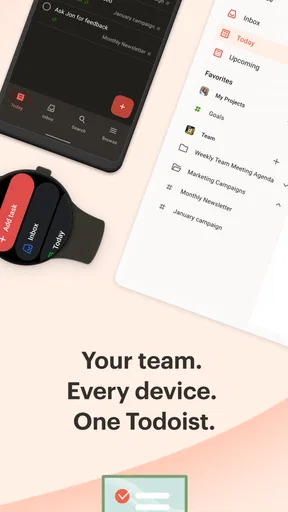
Todoist is available on various platforms, including Android, iOS, Windows, macOS, and web browsers. This cross-platform availability ensures that you can access your tasks and projects from virtually any device, making it convenient to stay organized whether you’re at home, work, or on the go.
Is Todoist free to use, and what features are included in the free version?
Yes, Todoist offers a free version that includes essential task management features such as task creation, deadlines, and basic project organization. However, for advanced features like reminders, labels, and productivity tracking, you would need to upgrade to one of the premium plans.
How does Todoist handle task collaboration with others?
Todoist allows you to easily collaborate with others by sharing projects and assigning tasks. You can invite team members or collaborators to join your projects, enabling efficient teamwork. This feature is especially useful for work projects or group activities that require coordinated efforts.
Can Todoist integrate with other apps and services?
Yes, Todoist integrates with a variety of other apps and services to enhance productivity. Popular integrations include Google Calendar, Slack, and Dropbox. These integrations allow you to sync tasks seamlessly across platforms, keeping all your information in one accessible place.
How does Todoist support productivity and task management?
Todoist supports productivity through features like priority levels, recurring tasks, and project templates. The app’s intuitive interface helps you organize tasks into projects and set deadlines. Additionally, Todoist’s Karma system gamifies task completion, encouraging users to stay on top of their productivity goals.


